Work Services About Pricing Start a project Call 801 380 6854

Custom software and web apps for small businesses.

Thornwood Digital builds the software a business runs on: client portals, custom CRMs, admin dashboards and ordering backends, made as web apps that install on a phone like an app. You don’t need a tech person on staff to run it: we host it and keep it updated on a monthly plan. We’re a small studio in Pleasant Grove, Utah, working with businesses anywhere in the U.S.

Quoted per project after a free call. We reply within one business day.

What custom software do you build?

Software a business runs on every day, built as web apps: client portals, custom CRMs, admin dashboards and backends, member areas, and booking, ordering or payment tools. Each one runs in the browser and installs on a phone or computer like an app, shaped around how that business already works.

Client portals

The portal every Thornwood client logs in to: site status, inquiries, requests and invoices. See the portal

Custom CRMs and operations apps

JaxHQ, the app we run our own studio on, from leads to signed agreements to invoices. Read about JaxHQ

Admin dashboards and backends

The orders, wholesale and affiliate backend behind a wholesale e-commerce brand, and the Plan Manager Jeff Adams Design Group’s office edits its house plans in. See the wholesale backend

Member areas and subscriptions

The studio a preschool teacher uses to publish her curriculum, email members and bill them. Miss Annette’s case study

Quoting, ordering and catalog tools

A print-sales system that prices 464 photographs live across finishes and sizes. Rick Nye’s case study

Apps for your customers

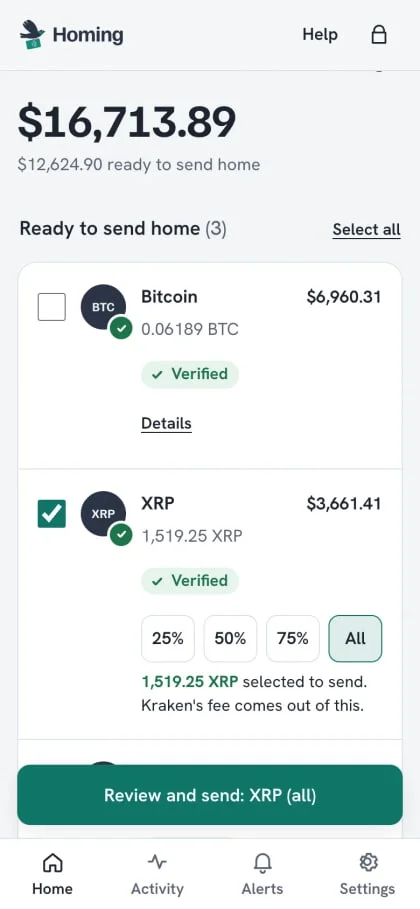
Homing, a web app people install to move their own funds from Kraken to their own wallet. Homing’s case study

Software we’ve built, and still run.

Three apps we built and still run: the one we run our studio on, one we built for the public, and one we built for a client. Every one is live today.

JaxHQ, the CRM and operations app we run Thornwood on

What it does. Leads, clients, agreements clients sign online, invoices they pay by card or bank, a production board for every build, uptime checks on every client site every 15 minutes, and the client portal, which is its own separate app.

How it’s built. An installable web app with push notifications, built with React on Cloudflare: serverless functions, a D1 database and R2 file storage. Sign-in takes a password plus a second step (an emailed code or an authenticator app), or a passkey.
How we run the studio on it More screens

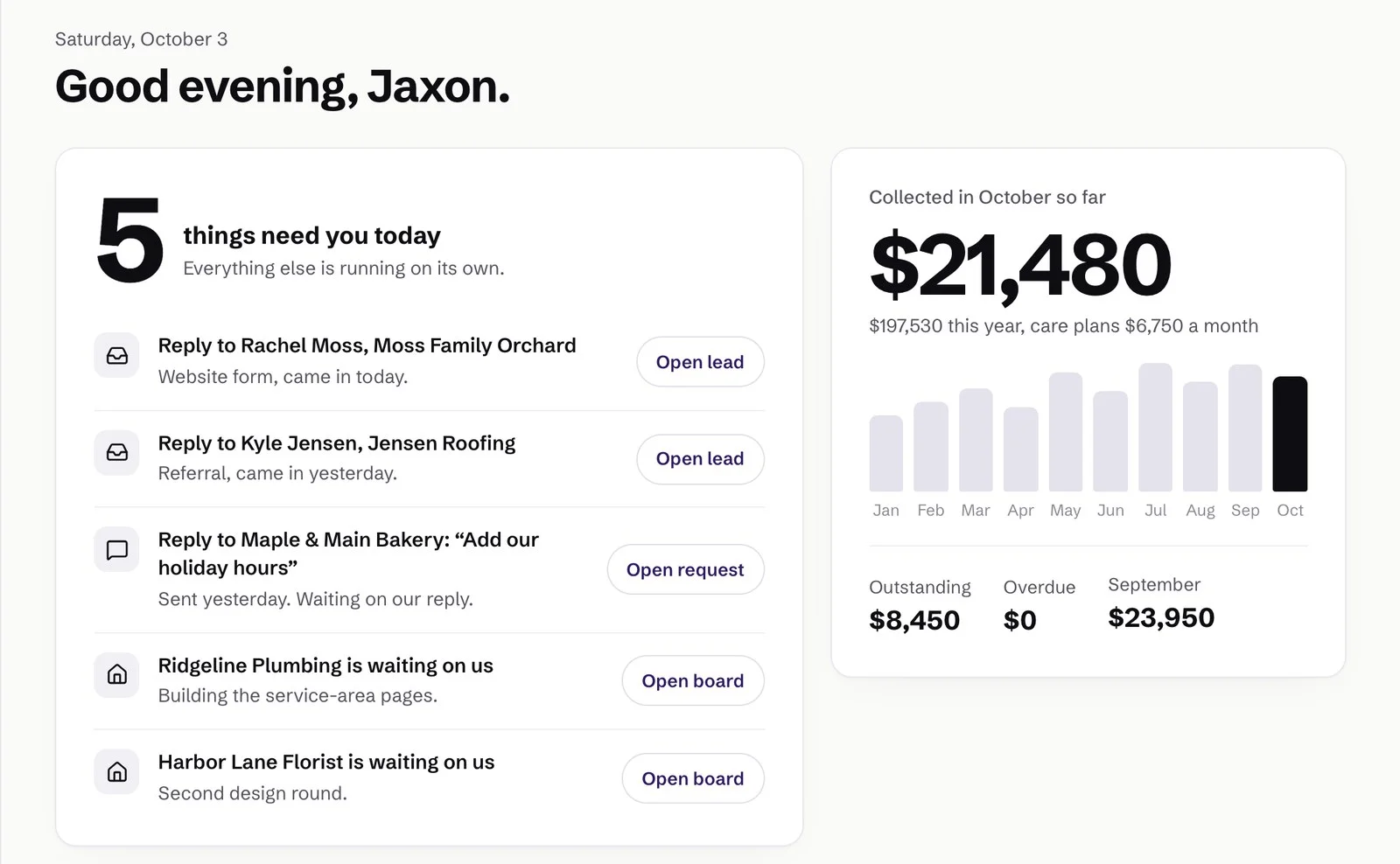
JaxHQ overview with demo data: the things that need attention today, each with an Open button, beside the month’s collected payments
Each morning starts with what needs us today.Leads and client requests waiting on a reply sit at the top.
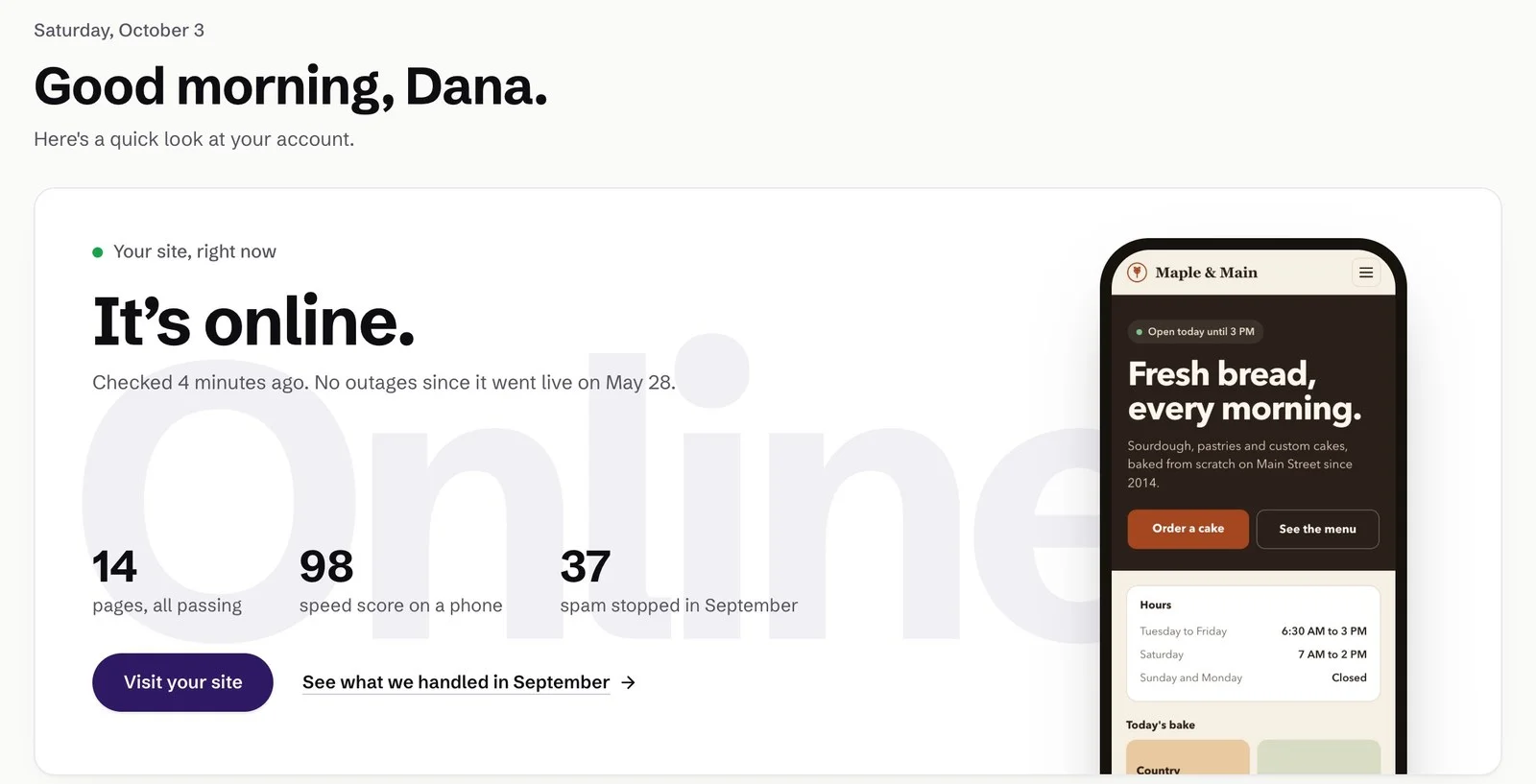
Client portal home for a demo bakery: the site is online, checked minutes ago, with its pages, speed score and spam stopped this month
The portal every client gets.Their site, their leads and the month’s work, in one login.

Homing, an app people install to move their own funds

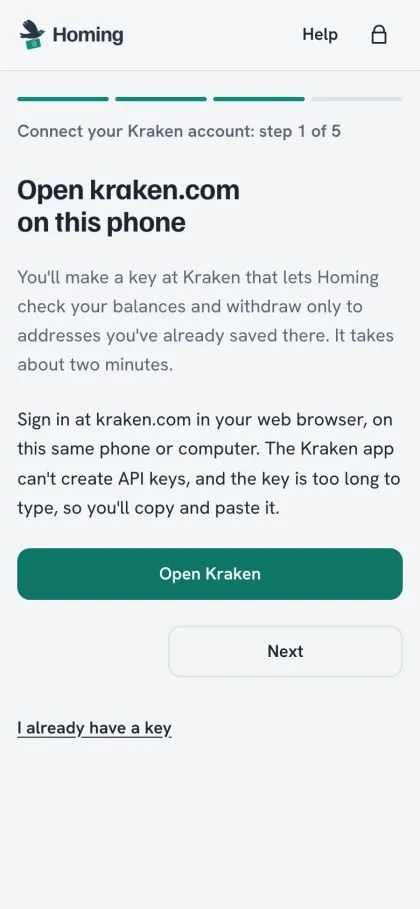
What it does. Homing helps people move their own funds from their Kraken account to their own hardware wallet in one tap. We built it and run it, and it never holds anyone’s funds.

How it’s built. An installable web app with passkey sign-in (Face ID, a fingerprint or a passcode instead of a password). The Kraken key is encrypted in the browser before it’s saved, so the server only ever stores a locked box it can’t open. Price alerts arrive as push notifications, and an admin console runs invites without ever showing a balance.

Read the Homing case study Its security page

Homing’s home screen with example data: a total balance, coins ready to send home marked Verified, and a Review and send button Homing’s Connect Kraken screen, step 1 of 5: open kraken.com on this phone to make a key that can only check balances and withdraw to saved addresses

The backend behind a wholesale e-commerce brand

An online store with a wholesale program, an affiliate program and a fulfillment warehouse, all run by the owner from one admin. The client stays unnamed, so there are no screens here, just what the software does.

Built on Cloudflare Pages with serverless functions, a D1 database and R2 storage for product media.

  • Approval-only wholesale accounts. Buyers apply, the owner approves them, and wholesale prices only apply to an approved, signed-in account.
  • An affiliate program. Each affiliate gets a discount code and a portal with commission by month and payout history, plus a receipt when a payout is made.
  • Warehouse shipping through ShipStation. Paid orders flow to the fulfillment warehouse, tracking flows back, and the customer is emailed when it ships.
  • Live USPS rates and delivery status, and every order on a timeline from placed to delivered.
  • Branded emails at every step: order received, shipped, sign-in links, approvals and payout receipts.
  • One admin dashboard for orders, customers, the catalog and stock, discounts, reviews, affiliates, payouts and sales tax.
  • Monitoring. A health check tests the database, email, shipping quotes and the warehouse sync, and every day an automated shopper walks the store and alerts us if anything breaks.
  • Sign-in without passwords for customers and affiliates (a one-time email link), and rate-limited, hashed passwords for the admin.

JaxHQ and portal screens use a demo account: the businesses, people and numbers in them are made up. Homing screens are the example screens from Homing’s own public homepage.

Should I build custom software or use HoneyBook, Jobber or a regular CRM?

Start with off-the-shelf if it fits. Tools like HoneyBook, Jobber and the big CRMs are ready today and cost a monthly fee instead of a build. Custom software earns its place when you’re bending your business around a tool, paying for several tools that don’t talk to each other, or doing something no product does, and we’ll tell you on the first call which side you’re on.

Off-the-shelf is the right call when

  • Your process looks like most businesses in your trade, which is exactly who those tools are made for
  • You need something running this week
  • A monthly fee is easier on cash flow than paying for a build
  • The tool’s limits aren’t costing you time or customers yet

Custom software pays off when

  • Your team keeps a spreadsheet next to the tool to cover what it can’t do
  • The same customer gets typed into three different systems
  • You sell or deliver something no product handles, like a paywalled weekly curriculum or 464 prints priced live by finish and size
  • You want to own the software and your data outright instead of renting them

Works like an app on your phone. No app store.

Do you build mobile apps? Web app (PWA) or native?

We build web apps only, specifically progressive web apps (PWAs): software that runs in the browser and installs on a phone’s home screen, where it opens full screen like an app and can send notifications. We don’t build native App Store or Google Play apps. For most business software (portals, CRMs, dashboards, booking and ordering), a PWA does the job with one build that works on iPhone, Android and computers.

On an iPhone, notifications start once the app has been added to the Home Screen. Both JaxHQ and Homing work this way.

A web app is enough when

  • People use it to look things up, fill things in, approve, book or pay
  • You want an update live the moment it ships, without waiting on app store review
  • It has to work on phones and computers alike
  • A notification is enough to bring people back

You need a native app when

  • It has to talk to hardware, like Bluetooth devices or NFC tags
  • It must keep working in the background, like tracking location all day
  • Being found in the App Store is part of how you sell it
  • It needs phone features a browser can’t reach. If that’s you, we’ll say so on the first call instead of forcing a web app to fit.

What does custom software cost?

There’s no published price for custom software. Every project is quoted after a free call, once we know what it has to do, and you see the number before anything is built.

What moves the number:

  • How many kinds of people use it (customers, staff, admins) and what each one may see
  • How many screens and steps it takes to do the job
  • Connections to other tools, like payments, shipping or calendars
  • Money and private data, which need more security work and testing
  • Moving your existing records in from what you use today

How long does it take to build?

There’s no standard timeline either. You get one with the quote, and it depends mostly on how much the first version has to do and how quickly decisions get made.

What moves the date:

  • The size of the first version. A smaller first release ships sooner, and more can follow
  • How fast feedback and content come back to us
  • Access to other services: accounts, API keys and approvals from the tools it connects to
  • Bringing in old data, and testing anything that handles money

Who owns it, where it lives, and who keeps it running.

The questions to ask any developer before you sign, answered from the software we already run.

Who owns the code and the data?

You do. Once the project is paid in full, everything built specifically for it is yours, the code included, and your data is yours from the first day. We keep the rights to tools we built before your project, the same as our terms say for every build.

There’s no platform taking a cut and no license to renew. Read the terms of service.

Where is it hosted?

On Cloudflare, the same network our websites run on. Our apps run as serverless functions with a D1 database (Cloudflare’s built-in database), so there’s no server of yours to patch or reboot, and we set up and manage the hosting for you.

What happens after launch?

Your software can stay on a monthly care plan: we host it, watch it, keep it updated and make the changes you ask for, and you reach the person who built it. Every plan is month to month.

See the plans on the pricing page and what we do month to month in after launch.

Is it secure?

Security is designed in from the first screen, with the same methods our own apps run on: passkey or two-step sign-in, passwords stored only as one-way hashes, secrets encrypted and never sent to the browser, limited sign-in attempts, and each kind of user seeing only what they need.

In plain words:

  • Passkeys or two-step sign-in. A passkey is Face ID, a fingerprint or a passcode instead of a password, and can’t be phished. Two-step adds an emailed code or an authenticator app.
  • Passwords are never stored, only a one-way scrambled version (a hash) that can’t be turned back into the password.
  • Secrets are encrypted and never sent to the browser. In Homing, the most sensitive key is encrypted on the person’s own device, so our server can’t read it.
  • Sign-in attempts are limited, so nobody can guess passwords at speed.
  • Each kind of user sees only what they need. Anything not explicitly allowed is refused.

What tools can it connect to?

Anything with an API, which is the door other software uses to talk to it. Our builds connect to Stripe for payments, Google Calendar, Google Analytics and Search Console, ShipStation and USPS for shipping, the Kraken API, GitHub, Instagram and LinkedIn, plus email and push notifications.

Who does the work?

Jaxon Carroll builds it, and you talk to him directly, not to an account manager. Thornwood is a small team in Pleasant Grove, Utah. We use AI tools, including Claude, in our development, and every line ships through a person who reads it first.

Meet the team on the about page, or see everything we build, from custom websites to AI automation.